A group of phones only
A group does not need a computer. Two or more phones and tablets — iPhone, iPad, Android — can be a group of their own. This page says what works then, what waits, and why. It is the same app and the same rules as in a group with a computer (see Phones and tablets); only the facts the app shows change.
What changes when there is no computer
The app knows whether the group has a computer (group_has_host in /api/status). When it does not:
- There is no Path. A group path (
~/.clipshot/sync/<name>) is something you paste on a computer, so neither the feed, the offer at the top of Home nor the Android notice offers Path / Copy path. Each item offers only its own copy: Copy for a text, Copy image for a picture, Copy file for a file where the phone’s clipboard can hold one (Android). On iOS a file that is not a picture stays in Files → Clipshot → Received, and the row says so. - Another phone counts as a delivery. In a group with a computer, a share is “sent” only once a computer has it. Without one, the other phone taking it is the delivery.
- The pairing dialog still shows the install command, labelled «On a computer — install & pair», so you can add the first computer later.
What works and what waits
| Situation | What happens |
|---|---|
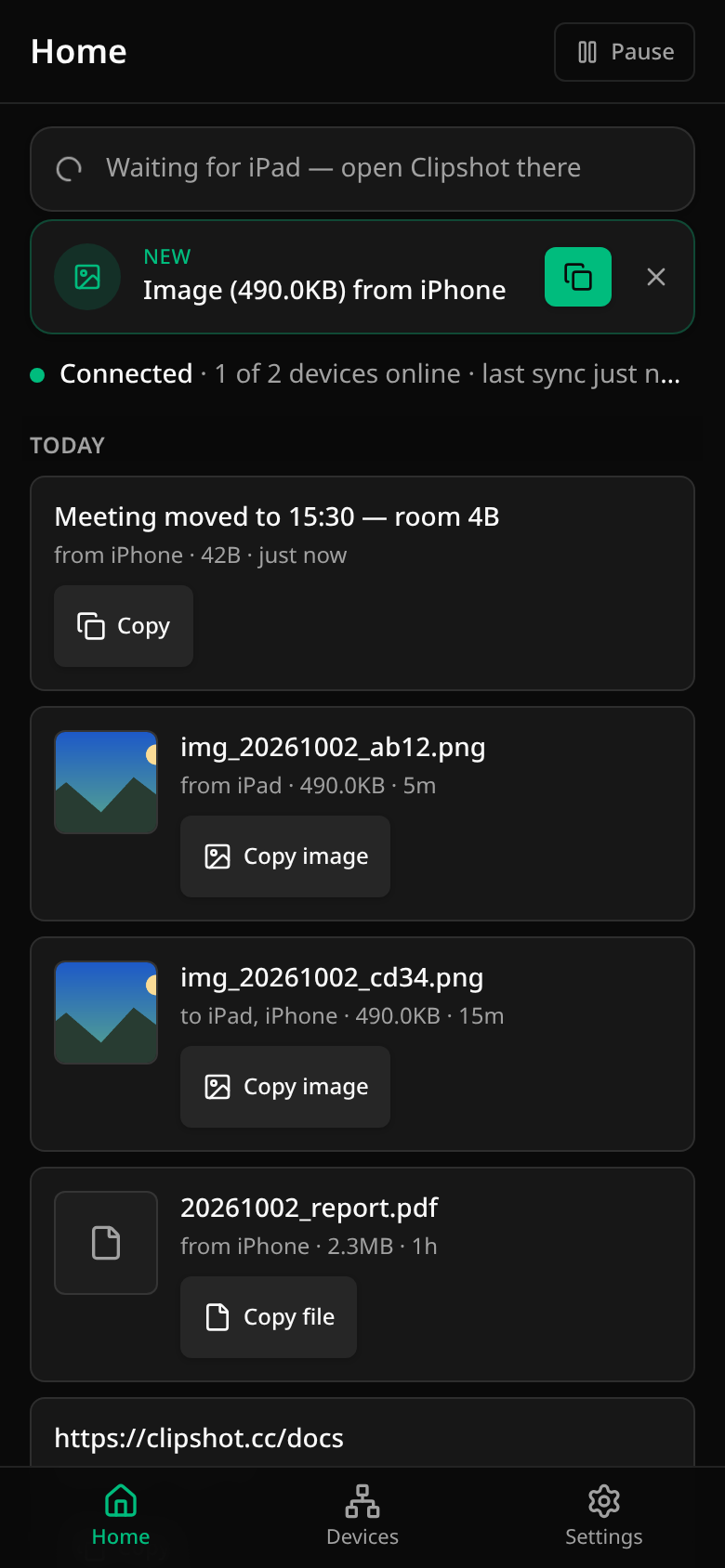
| Both apps are running (in front, or Android’s background service) | Text, pictures and files cross directly, phone to phone, and are offered at the top of Home (and in the Android notification). Nothing goes onto the clipboard until you tap the copy act or bring Clipshot to the front. |
| The receiving iPhone is asleep — a text | The notification itself carries the text, end-to-end encrypted: up to 2.6 KB as it is, up to 64 KB compressed. Long-press the notice and Copy puts it on the clipboard without starting the app and without the network. Larger texts arrive when the app runs. |
| The receiving iPhone is asleep — a picture | The notification carries the picture’s name and a small sealed preview, not the picture itself. Copy on the card copies the picture if its bytes are already on the phone. If they are not, the card says «Waiting for <sender>», opens Clipshot, and Home shows a waiting row («Waiting for iPad — open Clipshot there»). The picture arrives when the sender’s app runs; the waiting row then turns into an ordinary offer. It disappears after ten minutes if nothing comes. |
| The receiving iPhone is asleep — a file | The notification names the file only; the file arrives when the apps run. |
| Sharing from another app (Share → Clipshot) | The Share sheet sends the item to the first phone that takes it, and that counts as sent («Sent ✓ via <phone>»). Nothing goes onto the sending phone’s clipboard: a picture or text stays as it was, and there is no path. The phone that took it tells the hub, so an asleep iPhone gets the notice (and the sealed text or preview) as for any other item. |
| The sending phone’s app is not running | Nothing can cross: with no computer in the group, the bytes live only on the phones that already have the item. iOS gives Clipshot no background process, so an iPhone sends when its app (or its Share sheet) runs. |
| Android ↔ iPhone | The same rules on both sides — one set of acts, one waiting row. A mixed Android + iPhone group without a computer has not yet been measured live; two Android phones and two iPhones (simulators) have. |
iOS notices are passive: a row in Notification Center, no banner and no sound, and iOS decides on its own whether to wake a suspended app for one — in our measurements it did not. So nothing promises background delivery to an iPhone; the notice is what you copy from, and the item lands when Clipshot is opened.
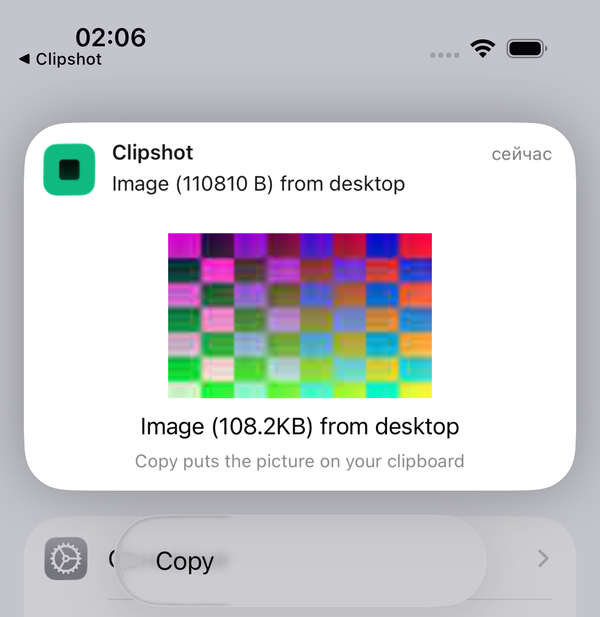
(The card above is from the iOS Simulator lane, in a group with a desktop; in a group of phones only the same card says «Waiting for <sender>» while the picture is not on the phone.)
Nothing is stored on a server
The items travel phone to phone, directly or through a relay that forwards encrypted traffic. The hub (clipshot.cc) helps devices find and pair with each other and sends the notice to an absent iPhone. The content a notice carries — a text, a picture’s preview — is sealed on the sending device with a key derived from your group (the picture’s or file’s name rides beside it as plain metadata), and the hub passes it through without decrypting, logging or storing it. So there is no copy to fetch later: if no phone that has an item is running Clipshot, the item waits until one does.
Limits stated
- A phone declares its kind (phone / tablet) from the moment it pairs — the pairing offer, the hub and the first live connection all carry it — so Path never shows in a group of phones only, including right after pairing.
- A text over 64 KB (or one that does not compress into the notice) and the bytes of pictures and files need the apps to run.
- The lock-screen card before the first unlock after a reboot cannot read what it needs and says «Unlock to copy».